Blog: codeboxes
This blog is focused on code development, so it will frequently include code
snippets. Markdown natively supports code snippets, so I can talk about
FunctionFoo or reference baz::Bar. Unfortunately, I can barely tell that
"FunctionFoo" and "baz::Bar" are inline code snippets rather than normal text.
The benefit of inline code is distinction. Right now, all code snippets are
displayed in a monospace font without additional visual indicators. Inline code
snippets are flowed with the rest of the paragraph. They can disappear if their
content is mostly normal text. Code blocks are pre-formatted and thereby more
distinct:
#include <stdio.h>

int main (int argc, char* argv[]) {
	printf("Hello world.\n");
	return 0;
}
However, there are many other issues with the default block code: plain text is monotonous; there is no separation between distinct files; and pre-formatting is inherently space-inefficient, so "a few lines of code" can quickly occupy an entire mobile screen.
In this meta-blog, I document my upgrades to inline and block code. Namely, I added visual markers to inline code, created codeboxes for block code, and added code highlighting. I tried to maintain a style which is clean and simple, works in light or dark mode, and looks good on mobile and desktop.
Inline code
The default monospace font is good, but I wanted to make it pop a little.
I added some padding, changed the background color, and voila! FunctionFoo is
distinct from FunctionFoo. I reused the alternate background color later, so I
used a CSS custom property. I previously used Sass to get variables in CSS,
but since custom properties have been widely available since 2017
(mdn web docs), I decided to try them out. I'm happy to say I haven't had
problems, gained a new tool in my toolbox, and now rely on fewer libraries.
In my later color scheme I tried to find colors that look good
together in light or dark mode, but found a medium gray was less readable in
both cases. I picked a light grey for light mode and used a @media rule to
change the alternate background color to a darker gray in dark mode.
I've noticed many sites with rounded borders for inline code. I don't know the design philosophy, but I feel like it's busier without much added benefit. For now at least, my inline code will remain squared with an open border policy.
Block code
I wanted borders to establish code boundaries and a titlebox since most snippets have an associated filename. First, I created a mock-up codebox in Inkscape:
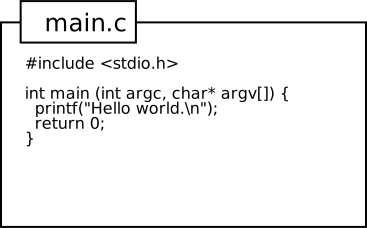
I floated the title above the main content so that it looks like a sticky note but otherwise opted for a no-frills style. I didn't round my borders or add a drop-shadow. I moved the titlebox and made it clickable, but the mock-up is otherwise very similar to my final codebox.
Getting the titlebox working right was a little annoying. Between thinking
z-index would do anything and getting the spacing to look right, I fiddled a
lot with the CSS. I ended up getting away with position: relative and
top: -1em for the titlebox.
I made codeboxes collapse if you click on the filename to reduce the impact of long codeboxes. This is impossible without JavaScript, so unfortunately terminal browsers won't benefit (but they won't suffer — I ensured codeboxes are expanded by default). A side effect of the floating titlebox is that codeboxes do sort of get a shadow when collapsed. It looks super cute when they are tiled next to each other (see the gallery below).
See Appendix B for the code that makes my codeboxes work.
Syntax highlighting
My other major addition to block code is syntax highlighting. I wanted a color scheme that works well on both light and dark mode. There are plenty available online, but I wanted to make my own palette. My code highlighting extension outputs Pygments-like tokens, so I set to work defining a basic palette for the list on Pygments. I tried to pick distinct colors that weren't too dark for dark mode or too light for light mode. I created the language gallery during this process to get a sense of how the palette would work for some common languages.
Keyword
Name
Type
Function
String
String Escape
Number
Attribute
Comment
DiffDeleted
DiffInserted
I tried to reuse colors when possible. I noticed JavaScript Infinity was
tagged as a KeywordConstant, so I reused my Number color for KeywordConstant
tokens. KeywordDeclaration is used in JavaScript and other languages without
strong types, so I reused the Type color. I reused the Function color for HTML
tags (NameTag) since HTML lacks functions. But then I created a new pink for
attributes since it looked so nice with the blue. I tried to follow the
guidance from Pygments on Token types, but some are lexed differently for me. I
might still fiddle with the colors in the future, but for now I like these.
Here is a C example:
main.c
#include <stdio.h>

int main (int argc, char* argv[]) {
	printf("Hello world.\n");
	return 0;
}
Check out the gallery to see how it looks for other languages.
Additional components
I use goldmark for Markdown
processing. By default, goldmark prohibits raw HTML. This sounds fine,
but to make my codebox (specifically the titlebox), I
needed to group data (title & code) and apply classes. If I was writing plain
HTML I would have added a <div> and been done. I didn't want to lift the
restriction unnecessarily because it could reduce security in the future and
because I do not want my blog source files to become cluttered. Luckily,
there is a Markdown extension for this scenario: fences. The goldmark
extension is called goldmark-fences and allows code to be wrapped in
<div>s with custom IDs, classes, and data- attributes. Three or more colons
::: are used to create a fence. For example, combining the CSS
.test__block { color: red; } and the following Markdown:
::: {.test__block}
```
Hello world!
```
:::
results in:
Hello world!
Ultimately, fences do allow arbitrary HTML creations but are succinct and fit the Markdown aesthetic. I could have technically implemented all my code highlighting with just Markdown fences, but thankfully there is an extension for this scenario as well. goldmark-highlighting uses chroma and the standard fenced code language indicator to highlight Markdown code blocks. With a little configuration, both were easy to use. There are some lexers that could use some work (CMake, CSS) or that I wish were added (ssh_config), but it works great for a basically drop-in solution.
Miscellaneous design elements
- I set the tab width to 2. This is my preference when writing code.
Future work
There are still quite a few Pygments Tokens that I didn't define colors for. I foresee myself changing code highlighting a little bit as I see how it looks with more languages. I also want to add site settings to switch between light and dark mode if needed.
Overall, everything came out nice. I'm excited to use my new codeboxes.
Appendix A: Language gallery
fib.c
#include <stdlib.h>

unsigned fib(unsigned n) {
	// Special cases.
	if (n == 0) return 1;
	if (n == 1) return 1;

	// Table setup.
	static unsigned* table = NULL, table_size = 0;
	unsigned index = n - 2;
	if (table == NULL) {
		for (table_size = 1; table_size < index; table_size <<= 1);
		table = malloc(sizeof(unsigned) * table_size);
	}
	if (index >= table_size) {
		unsigned old_size = table_size;
		while (index >= table_size) table_size <<= 1;
		table = realloc(table, sizeof(unsigned) * table_size);
		for (; old_size < table_size; ++old_size) {
			table[old_size] = 0;
		}
	}

	// Computation.
	if (table[index] == 0) {
		table[index] = fib(n - 1) + fib(n - 2);
	}
	return table[index];
}
hello.cc
#include <iostream>

constexpr double my_PI = 3.1415926;
const int x = 10;
const unsigned y = 0xDEADBEEF;
unsigned oct_z = 027;
long bignum = 293100039439L;
bool flag = false ? true : false;

int main() {
	std::cout << "Hello world." << std::endl;
	return 0;
}
hello.sh
#!/bin/sh

cat > hello.$$.tmp <<EOF
Hello world.
EOF
echo Hello world. > hello.$$.tmp
msg="$(cat hello.$$.tmp)"
printf '%s\n' "$msg"
rm hello.$$.tmp
include/widget/MenuItem.h.diff
diff --git a/include/widget/MenuItem.h b/include/widget/MenuItem.h
index 3bb463b..de3af4f 100644
--- a/include/widget/MenuItem.h
+++ b/include/widget/MenuItem.h
@@ -24,7 +24,7 @@ public:
   virtual MenuItem* clone() const = 0;

 protected:
-  void setValue(std::string str);
+  void setValue(std::string str) { entry.setString(str); }

 private:
   void setActive(bool active = true);
.ssh/config
Host cci_landing
	User MCFDwdrf
	HostName blp01.cci.rpi.edu
	Port 22
Host github.com
	IdentityFile ~/.ssh/git_upload
Makefile
CC=gcc
CFLAGS=-g
LD=ld

main: main.o fib.o
	$(CC) $(CFLAGS) -o $@ $^

%.o: %.c
	$(CC) $(CFLAGS) -c -o $@ $<

clean:
	rm -fr main *.o
hello.js
/**
 @brief IIFE Hello world.
 */
(function () {
	const words = ["Hello", "world."];
	if (!isNan(Infinity)) {
		console.log(words.join(' ');
	}
	Array.from(document.querySelectorAll(".blog__codebox")).map(x => {
		x.innerHTML = "<p>Welcome back to coding</p>";
	});
})();
snippet.html
<!DOCTYPE html>
<html>
	<head>
		<title>Webpage</title>
		<style>
		.foo {
			color: red;
		}
		</style>
	</head>
	<body>
		<h1>Hello world.</h1>
		<p class="foo">Words words words</p>
	</body>
</html>
CMakeLists.txt
cmake_minimum_required(VERSION 3.8)
project(stars VERSION 0 LANGUAGES CXX)

# Dependencies
include(cmake/Arial.cmake)
if(NOT FOUND_ARIAL)
  return()
endif()

find_package(SFML 2 REQUIRED COMPONENTS graphics)

# Add debugging warnings.
if(MSVC)
  string(APPEND CMAKE_CXX_FLAGS_DEBUG " /W4")
else()
  string(APPEND CMAKE_CXX_FLAGS_DEBUG " -Wall -Wextra -pedantic")
endif()

add_subdirectory(src)

if("${BUILD_TESTING}" OR "${STARS_BUILD_TESTING}")
  add_subdirectory(test)
endif()
This codebox has "no" title.
AKA a non-breaking space.
.golangci.yml
linters:
  disable:
    - govet
linters-settings:
  errcheck:
    exclude-functions:
      - (*github.com/gin-gonic/gin.Context).AbortWithError
farm.json
{
	"farm": {
		"animals": [
			"cow": {
				"count": 10,
				"area": 1,
				"leader": "Tom"
			},
			"chicken": {
				"count": 20,
				"area": 25,
				"leader": "Boo"
			}
		],
		"crops": [
			"wheat": {
				"area": 25
			},
			"corn": {
				"area": 50
			}
		]
	},
}
sample.tex
\documentclass{article}

\author{John Doe}
\title{Report}
\date{\today}

\begin{document}
	\maketitle
	\par This report includes the following sections:
	\begin{enumerate}
		\item Introduction
		\item Conclusion
	\end{enumerate}
	%%%%%%%%%%%%%%%%%%%%%%%%%%%%%%%%%%%%%%%%%%%%%%%%
	\section{Introduction}
	\par The topic of the report is introduced here.
	%%%%%%%%%%%%%%%%%%%%%%%%%%%%%%%%%%%%%%%%%%%%%%%%
	\section{Conclusion}
	\par The report is summarized and concluded here.
\end{document}
Appendix B: codebox source code
blog-codeboxes.css
:root {
	--border-color: black;
	--alt-bg-color: #eee;
}

@media (prefers-color-scheme: dark) {
	:root {
		--border-color: white;
		--alt-bg-color: #333;
	}
}

.blog__content p code {
	background-color: var(--alt-bg-color);
	padding: 0.125em 0.25em;
	margin: 0 0.1em;
}

.blog__codebox {
	border: 2px solid var(--border-color);
	display: inline-block;
	margin-top: 1em; /* titlebox margin */
	vertical-align: top;
	max-width: calc(100% - 2em); /* Leave space for titlebox */
}

.blog__codebox__title {
	background-color: var(--alt-bg-color);
	border: 2px solid var(--border-color);
	padding: 0.5em 1em;
	display: inline-block;
	position: relative;
	top: -1em;
	left: 2em;
}

.blog__codebox__title p {
	padding: 0;
	margin: 0;
	display: inline;
}

.blog__codebox__title p::before {
	content: "[-]";
	color: blue;
	padding-right: 0.5em;
	cursor: pointer;
}

@media (prefers-color-scheme: dark) {
	.blog__codebox__title p::before {
		color: lightblue;
	}
}

.blog__codebox code {
	tab-size: 2;
}

.blog__codebox pre {
	position: relative;
	overflow-x: scroll;
	padding: 0 1em;
}

.blog__codebox__title + pre {
	top: -0.5em; /* even out vertical spacing */
	margin-top: 0;
}

.blog__codebox--collapsed pre {
	display: none;
}

.blog__codebox--collapsed .blog__codebox__title p::before {
	content: "[+]";
}
blog-codeboxes.js
jQuery(function($) {
	// Make codeboxes collapsible.
  $(".blog__codebox__title").on("click", ev => {
    $(ev.target).parents(".blog__codebox")
      .toggleClass("blog__codebox--collapsed");
    $(ev.target).parents(".blog__codebox__container")
      .toggleClass("blog__codebox__container--collapsed");
  });

	// Add codebox control buttons.
	$(".blog__codebox-controls").append(
		"<button class='blog__codebox-controls__collapse'>Collapse all</button>"
	).append(
		"<button class='blog__codebox-controls__expand'>Expand all</button>"
	);
	// Add collapse button effect.
	$(".blog__codebox-controls__collapse").on("click", ev => {
		let section = $(ev.currentTarget).parents(".blog__codebox-section");
		section.find(".blog__codebox").addClass("blog__codebox--collapsed");
	});
	// Add expand button effect.
	$(".blog__codebox-controls__expand").on("click", ev => {
		let section = $(ev.currentTarget).parents(".blog__codebox-section");
		section.find(".blog__codebox").removeClass("blog__codebox--collapsed");
	});
});